Lecture recording here.
Lab recording here.
This week we are going to look at security issues within an operating system. We will look at the RSA encryption alorithm. We will also look at authentication and encryption with openssl.
| Security | 5 Steps to Secure Linux (protect from hackers) |
| RSA Encryption | https://www.youtube.com/watch?v=ZPXVSJnDA_A |
| OpenSSL | Encryption and decryption with openssl |
| Name of the Algorithm | Short Description of the Algorithm | Efficacy |
|---|---|---|
| RSA (Rivest-Shamir-Adleman) | One of the most widely used public-key cryptosystems, based on the difficulty of factoring large integers. Commonly used for secure communications and digital signatures. | Strong at key sizes ≥2048 bits; susceptible to quantum attacks. |
| ECC (Elliptic Curve Cryptography) | Uses elliptic curves over finite fields for encryption, offering the same security as RSA with much smaller key sizes. Common in modern secure communications. | More efficient than RSA at smaller key sizes; resistant to many classical attacks. |
| ElGamal | Based on the discrete logarithm problem, commonly used for encryption and digital signatures. Forms the basis for DSA (Digital Signature Algorithm). | Secure with large key sizes; inefficient due to message expansion. |
| Diffie-Hellman (DH) | Used for secure key exchange rather than encryption itself, based on the difficulty of computing discrete logarithms. | Strong with long key sizes; vulnerable to MITM attacks without authentication. |
| DSA (Digital Signature Algorithm) | Used for digital signatures, derived from ElGamal, providing authentication and integrity verification. | Strong but requires a good random number generator; less efficient than ECC. |
| Paillier | A homomorphic encryption scheme that allows computations on encrypted data without decryption. | Secure but computationally expensive, mainly used in privacy-preserving applications. |
| McEliece | A lesser-known algorithm based on error-correcting codes, resistant to quantum attacks. | Very strong against classical and quantum attacks, but requires large key sizes. |
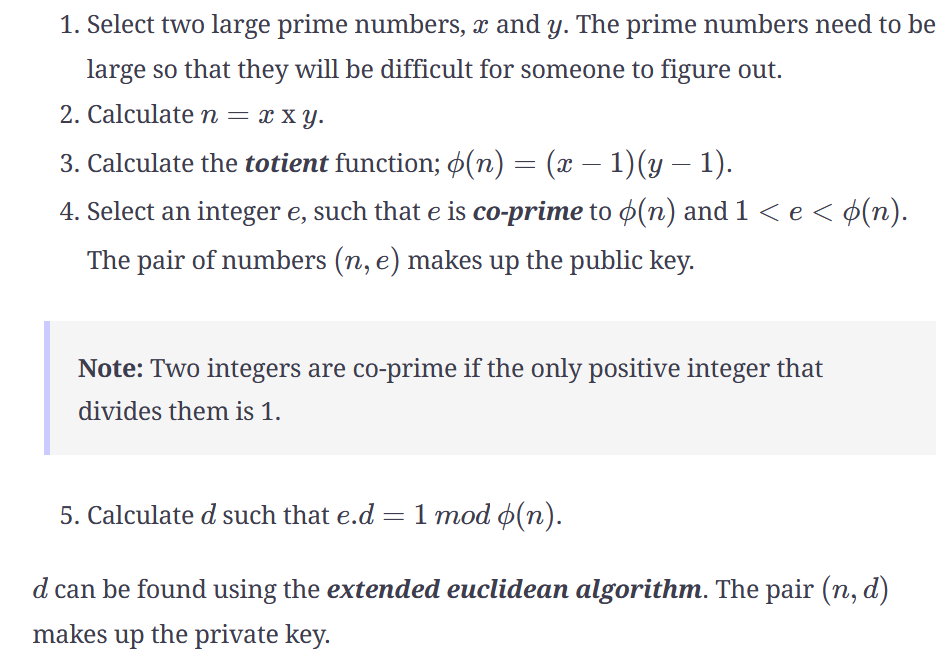
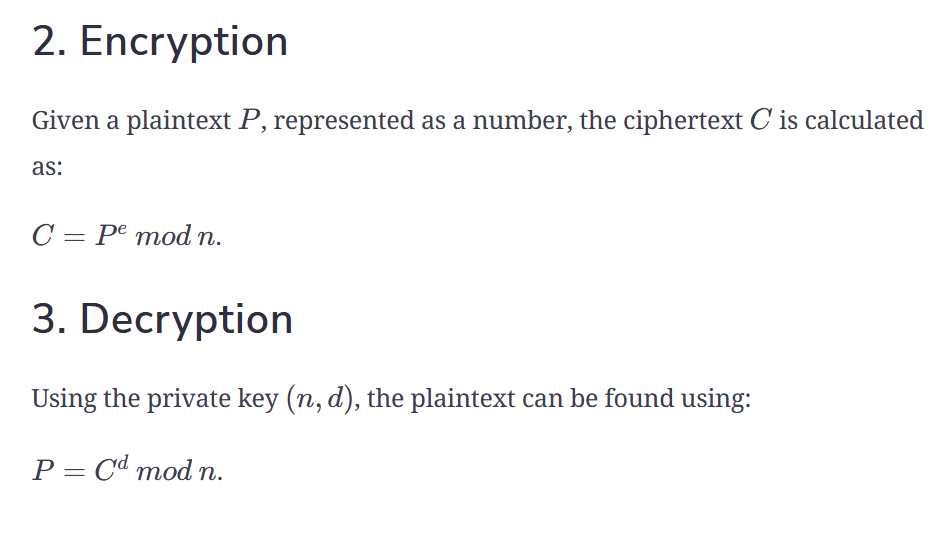
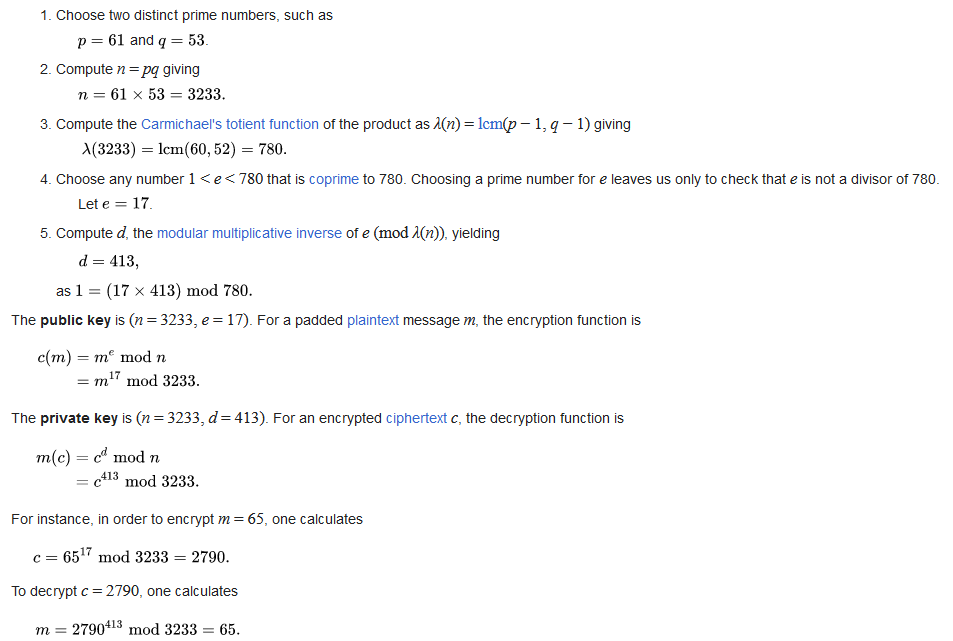
RSA Encryption


OpenSSL
1. openssl req
Runs OpenSSL's "req" (request) command, which is used to create and process certificate signing requests (CSRs) and certificates.
2. -x509
Specifies that the output should be a self-signed X.509 certificate instead of a certificate signing request (CSR).
X.509 is the standard format for public key certificates.
3. -nodes (No DES)
Prevents encryption of the private key with a passphrase, making it easier to use in automated environments.
If this option were omitted, OpenSSL would prompt for a passphrase to encrypt the private key.
4. -days 365
Specifies the certificate's validity period in days. In this case, the certificate will be valid for one year (365 days).
After this period, the certificate will expire, requiring renewal or replacement.
5. -newkey rsa:1024
Creates a new private key along with the certificate.
Uses RSA (Rivest-Shamir-Adleman) as the key algorithm.
The key size is 1024 bits, which is considered insecure today. A more secure option would be 2048 or 4096 bits (rsa:2048 or rsa:4096).
6. -keyout mycert.pem
Saves the generated private key to the file mycert.pem.
7. -out mycert.pem
Saves the generated self-signed certificate to mycert.pem.
Since the private key and certificate share the same filename (mycert.pem), they will be in the same file.
However, it's possible to specify different files for the private key and certificate.
Note: In the following demonstration code, you will have to generate a certificate for both the
server and client. it is therefore best to keep the server and client in separate directories:
client/Makefile,
client/client.cpp,
server/Makefile and
server/server.cpp.