I have created a basic javaScript tutorial below. For a full javaScript tutorial, see W3Schools JavaScript Tutorial.
The first example shows how javaScript accesses parts of a webpage: TemperatureConverter.css, TemperatureConverter.html.
The second example shows some basic mathematics and how javaScript accesses parts of a webpage: TemperatureConverter.css, Marks.html.
The third example shows validation: Guess.css, Guess.html.
The fourth example shows a constructor in javaScript: Marks.css, Marks.html.
The fifth example shows some multimedia with javaScript: Multimedia2.css, Homes.js, Homes.html.
The sixth and seventh examples show event handling:
The click event: Style.css,
Event.html.
The mouse-out event: Style.css,
MouseOut.html.
The eighth example shows drawing simple graphics on a canvas. The graphics are a line, a circle, text and gradient. It also
offers a clear to refresh the webpage:
Graphics.css,
Graphics.html.
The ninth example shows building up a webpage entirely from javaScript:
WebPage.css,
WebPage.html.
The tenth example demonstrates the use of the class name to group and test similar elements on a webpage. The bank webpage can be found at Bank.html and Bank.css.
The eleventh and twelfth examples show sending a request to a webpage.
XMLHttpRequest is a built-in browser object that allows to make HTTP requests in JavaScript.
Despite having the word "XML" in its name, it can operate on any data, not only in XML format. We can upload/download files,
track progress and much more. For a tutorial on XMLHttpRequest see
XMLHttpRequest.
The first is a request for the current Bitcoin value from a website: Bitcoin.html.
The second displays doggie pictures retrieved from a website:
styles.css,
dogs.js, and
dogs.html.
For a list of some online databases which provide an API, see Rapid API.
For a comparison of JavaScript's querySelector vs getElementById or getElementsByClassName, see
querySelector vs. getElementById: A Comparison, by Career Karma.
For a tutorial with querySelector, see
HTML DOM Document querySelector() by W3Schools.
For a tutorial with jQuery, see jQuery Tutorial, W3Schools.
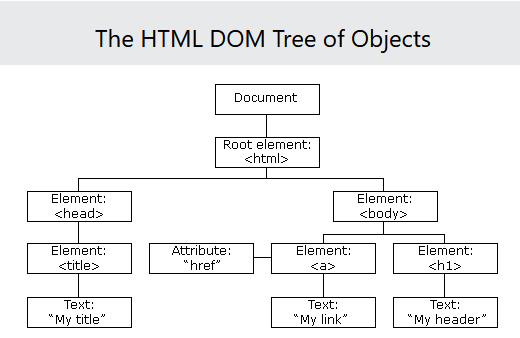
To understand JavaScript/jQuery, we need to understand the Document Object Model.
See The HTML DOM (Document Object Model.
The Document Object Model can also be seen below:
jQuery cheat-sheets can be found at jQuery Cheat Sheets.
jQuery sample code demos can be found at JQuery Code Demos.